Key Takeaways
- The storage on a working developer machine goes to build products, container images, package caches, and simulator runtimes, while source code accounts for a small fraction of it.
- Xcode alone commonly holds tens of gigabytes across DerivedData, device support files, simulator runtimes, and archives, most of which regenerates on demand.
- Measure before deleting. Two minutes with du tells you more than any list of folders someone else says are safe.
- Uninstalling an app is not always the same as removing all of its files. Nektony’s app uninstallation methodology evaluates uninstallers by whether they detect and remove associated service files.
- Apple recommends keeping 10 to 15 percent of the drive free, and staying above that line prevents most of the slowdowns people blame on the hardware.
A Mac used for development fills up in a way that feels unfair. The projects are a few gigabytes. The photos live in the cloud. Yet the machine reports 8 GB free, Xcode refuses to archive, Docker throws a no-space error mid-build, and the obvious answer is that 512 GB was never going to be enough.
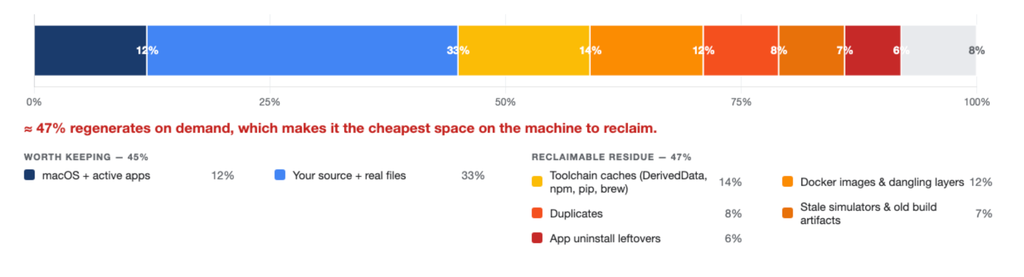
The obvious answer is usually wrong. Most of the drive is holding the exhaust of the toolchain: build artifacts, cached packages, container layers, simulator runtimes, and debug symbols for iOS versions nobody targets any more. Almost all of it regenerates from a network fetch or a rebuild, which makes it the cheapest storage on the machine to reclaim.
The disk fills with toolchain exhaust
Every tool in a modern stack is designed to trade disk for speed. Package managers keep archives so the next install skips the download. Build systems keep intermediates so the next compile skips the work. Container engines keep every layer so the next image build reuses what it can. Each decision is correct on its own, and together they turn a development machine into an archive of every state it has ever been in.
This is why the growth is invisible. Nothing announces itself, no single folder looks alarming, and the total arrives one cache at a time over eighteen months.
Where the space actually goes
Xcode. The heaviest contributor on most Apple-platform machines, spread across four places.
- ~/Library/Developer/Xcode/DerivedData holds build intermediates and indexes for every project you have opened, and Xcode rebuilds all of it when needed.
- ~/Library/Developer/Xcode/iOS DeviceSupport holds debug symbols, one folder per iOS version you have ever attached a device from.
- ~/Library/Developer/CoreSimulator holds simulator devices and their runtimes, which run several gigabytes each.
- Archives from every release build sit in ~/Library/Developer/Xcode/Archives until someone deletes them, and those are the one category worth keeping deliberately, because they contain the dSYMs you need to symbolicate crash reports from shipped builds.
Containers. Docker Desktop stores everything inside a virtual disk image. Deleting images inside the engine frees space for the engine, and the image file itself does not necessarily shrink by the same amount on the host. Docker exposes a disk usage limit in Docker Desktop settings, which is the setting to check when the file has grown past what you expected.
Package caches. Homebrew keeps downloaded bottles, npm and pnpm keep a content-addressed store, pip keeps wheels, Gradle keeps its caches, CocoaPods keeps a copy of every pod spec and source it has fetched. Individually modest, collectively substantial on a machine that has switched between projects for a couple of years.
Dependency trees. Every checked-out project carries its own node_modules, vendor, target, or .venv. Ten dormant side projects each hold a complete copy of the dependency tree that a single npm install would restore.
Leftovers from tools you removed. Dragging an app to the Trash removes the bundle. The preferences, caches, logs, launch agents, and support folders it wrote stay where they are, in several different hidden directories. Nektony’s app uninstallation methodology evaluates how thoroughly uninstallers detect and remove these associated files. On a machine that has cycled through database GUIs, editors, VPN clients, and three container runtimes, those leftovers can add up.
Snapshots. macOS keeps local Time Machine snapshots, which is why the Finder sometimes reports free space that Disk Utility does not. Space marked purgeable is real space the system will release under pressure, and it explains a chunk of the gap between what two tools tell you.
Measure before you delete
Any cleanup that starts with a list of folders from a blog post is a guess. Start with the actual distribution on your machine.
du -sh ~/Library/Developer/* 2>/dev/null | sort -h
du -sh ~/Library/Caches/* 2>/dev/null | sort -h | tail -20
docker system df
Then take the top three lines and deal with those. A single stale simulator runtime or one abandoned project’s dependency tree frequently outweighs everything else on the list, and knowing that keeps you from spending an hour clearing caches worth 400 MB.
For the visual version of the same question, a disk usage map shows where the weight sits by folder rather than by name, which is how you find the 40 GB directory you had forgotten existed.
What regenerates and what does not
Safe to remove, rebuilt or refetched automatically:
- DerivedData in full. Xcode recreates it on the next build, at the cost of one slow compile.
- Package manager caches. brew cleanup, npm cache clean –force, and the equivalents cost you download time, nothing else.
- Simulator devices tied to runtimes you no longer have, with xcrun simctl delete unavailable. Runtimes and platform components themselves are managed in Xcode’s components settings.
- node_modules in projects you are not touching this quarter.
- Docker images and build cache, through docker system prune, once you have checked what you are pruning.
Keep deliberately:
- Archives and dSYMs for builds that are live in the App Store or with testers. Losing those means losing readable crash reports.
- Device support folders for the iOS versions you actually debug against.
- Anything holding uncommitted work, which is worth a git status sweep across your projects folder before any bulk deletion.
The part that manual cleanup misses
Two categories resist a shell loop. The first is leftovers from removed applications, because they are scattered by design across ~/Library/Application Support, ~/Library/Caches, ~/Library/Preferences, ~/Library/Containers, ~/Library/Logs, and the launch agent directories, under names that rarely match the app you remember installing. The second is duplicates, which accumulate through downloads, exports, and repeated copies of the same asset set.
Both are jobs for tooling. A dedicated uninstaller like App Cleaner & Uninstaller maps an application to its full set of service files and removes them together, which also matters when a broken tool needs a genuinely clean reinstall rather than one that inherits its old preferences. A disk analyzer gives you the map. The manual path works too, and it takes an evening and a careful eye for paths that look important.
Keep the headroom
Apple’s guidance is to keep 10 to 15 percent of the startup disk free, and recent macOS releases behave better with more. Below that line, swap gets tight, Spotlight indexing competes with your builds, and system updates start failing on space. Developers hit that line faster than anyone else because their tools are the ones generating gigabytes per week.
A workable rhythm is short and boring: clear DerivedData when a build acts strange anyway, prune Docker monthly, sweep dormant projects’ dependency trees quarterly, and audit leftovers whenever you retire a tool.