At first, every AI Music Generator seems to promise the same thing: type an idea, wait a little, and receive a finished piece of music. After testing several platforms, I found that the promise is only half the story. The hidden cost is everything around the generation itself: the page layout, the number of distractions, the clarity of the next step, the way results are stored, and how much energy the user spends before actually listening.
That hidden cost becomes obvious when you compare tools side by side. I tested ToMusic AI with Suno, Udio, Soundraw, Mubert, Beatoven, and AIVA using realistic creator scenarios. I wanted music for short videos, lyric-based song sketches, calm background use, educational content, and cinematic scene ideas. I was not trying to crown a tool based on one lucky result. I was looking for the platform that made the whole process feel least wasteful.
Some platforms delivered stronger flashes of personality. Others were faster in certain tasks. A few felt better suited for background music than lyric-driven songs. But the more I tested, the more I cared about whether the workflow respected my attention. A cluttered or confusing tool can make even a decent output feel harder to use.
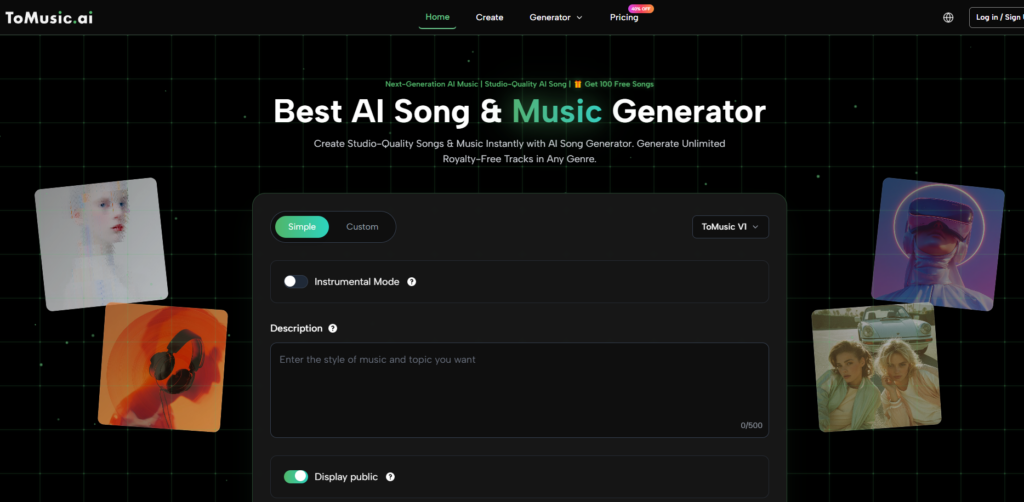
ToMusic AI performed well as an AI Music Maker because it reduced that hidden cost. The official site presents clear generation paths based on text descriptions or lyrics, with simple and custom modes, optional direction around style, mood, tempo, instruments, vocals, or instrumental output, multiple AI music models, and a Music Library for managing generated work. That structure made the platform feel calmer in repeated testing.
Why Attention Is Part Of Music Quality
Music generation is not only about the final audio file. It is also about the user’s ability to listen, compare, and decide. If a platform is visually noisy or confusing, it weakens the listening process. The user becomes less patient, less focused, and more likely to accept or reject a track too quickly.
This is why I treated ad distraction and interface cleanliness as serious scoring categories. They are not cosmetic details. They affect the creative process directly. A clean interface gives the user more mental space to judge rhythm, vocal tone, mood, and fit. A noisy interface turns the session into a task of navigation instead of listening.
ToMusic AI did not feel empty or oversimplified. It simply felt more direct than several alternatives. The user can begin with a general prompt or choose a more detailed custom direction. That makes the platform approachable without removing the ability to guide the result.
The Practical Test Setup
I used the same project categories across the platforms: a cheerful short video track, a lyric-based emotional song, a soft instrumental background, and a cinematic cue for a fictional scene. I judged each platform on sound quality, loading speed, ad distraction, update activity, interface cleanliness, and overall usability.
Why I Avoided Showcase Prompts
Showcase prompts can make almost any music tool look better than it feels in daily use. I avoided overly polished prompts and used the kind of language a real creator might type quickly. That made the test more revealing. Some tools seemed impressive with ideal inputs but less comfortable with ordinary creative direction.
Attention Cost Comparison Across Platforms
|
Platform |
Sound Quality |
Loading Speed |
Ad Distraction |
Update Activity |
Interface Cleanliness |
Overall Score |
|
ToMusic AI |
8.7 |
8.6 |
9.1 |
8.6 |
9.2 |
8.8 |
|
Suno |
9.0 |
8.1 |
8.0 |
9.1 |
7.8 |
8.4 |
|
Udio |
8.8 |
7.8 |
8.1 |
8.8 |
7.7 |
8.2 |
|
Soundraw |
8.0 |
8.7 |
8.6 |
8.0 |
8.8 |
8.2 |
|
Mubert |
7.8 |
8.8 |
8.3 |
7.9 |
8.3 |
8.0 |
|
Beatoven |
7.9 |
8.4 |
8.4 |
7.8 |
8.5 |
8.0 |
|
AIVA |
8.2 |
7.7 |
8.5 |
7.7 |
8.0 |
8.0 |
The results show a balanced picture. Suno scored highest in sound quality in this round because some outputs had stronger immediate presence. Udio remained strong for experimentation. Soundraw and Beatoven were comfortable for users who focus on background music. Mubert felt fast and useful for certain atmospheric needs. AIVA had value for people who think more compositionally.
ToMusic AI ranked first overall because it paired solid sound quality with a more comfortable working environment. Its advantage was not one explosive feature. It was the way the tool reduced unnecessary friction while still supporting practical creative control.
How ToMusic AI Reduced The Hidden Cost
The first reduction came from clear entry points. A user can begin with a simple generation path when the goal is speed, or use a custom path when lyrics and more detailed style direction matter. That matters because different projects begin at different levels of clarity. Sometimes I had a specific lyric. Sometimes I only had a mood.
The second reduction came from flexible description language. Being able to describe style, mood, tempo, instruments, vocals, or instrumental direction made the process feel more natural. I did not need to translate every idea into technical production language. I could describe what I wanted in creator-friendly terms.
The third reduction came from the Music Library. When several versions are generated, organization becomes part of the creative process. If a platform does not help the user keep track of outputs, every test feels temporary. ToMusic AI’s official Music Library positioning made it easier to think of each generation as part of a continuing project.
The Confirmed Workflow In Four Steps
The platform’s official process can be described simply without adding unsupported production claims. That is one reason it is easy to explain to new users.
From Prompt To Saved Result
- Choose a simple or custom generation path.
- Enter a prompt, lyrics, style, mood, tempo, instruments, vocal direction, or instrumental direction.
- Select an available AI music model when needed.
- Generate, review, save, manage, or download the result from the Music Library.
This is enough for many common projects. A short video creator can test background music. A songwriter can turn lyrics into a draft song. A marketer can explore ad-friendly audio. A teacher can create music for educational content. A game or film creator can test atmospheric directions.
Where The Sound Test Became Complicated
Sound quality was not easy to judge because different tools seem built for different creative expectations. Suno and Udio can feel more expressive when they interpret a prompt well. That gives them a real advantage for users chasing memorable vocal results. But expressiveness can also come with unpredictability. A bold result may be exciting once and harder to repeat later.
Soundraw, Beatoven, and Mubert often made more sense when I wanted music that supported content rather than dominated it. They can be practical for background use, where the goal is not necessarily lyrical personality. AIVA felt more structured and may appeal to users who think about composition in a traditional way.
ToMusic AI sat between those categories. It was not only a background tool, and it was not only a vocal experiment tool. Its value was that it supported text-to-music and lyrics-to-song tasks while keeping the overall workflow simple enough for repeated use.
Limitations Worth Considering Before Choosing
ToMusic AI still has the normal uncertainties of AI music generation. The first result may not match the intended mood. Lyrics may need clearer structure. A vocal direction may work better after adjusting genre or tempo language. Instrumental results may require several attempts before the emotional color feels right.
The platform also should not be described as a full studio system. There is no need to claim advanced features that the official site does not clearly present. For users who need detailed manual mixing, mastering, multi-track control, or professional release preparation, ToMusic AI may be only one step in a larger workflow.
Finest Fit For Low Friction Creators
ToMusic AI is especially suitable for users who want to create music without turning every session into a technical project. It fits content creators, small marketing teams, educators, hobby songwriters, game prototypers, and video makers who need a clear path from written idea to generated track.
It may not be the best fit for producers who want deep technical control. But for creators who value clarity, speed, organization, and a calm interface, it offers a strong balance.
Why Less Mess Can Mean Better Decisions
After the comparison, I felt that the cleanest workflow often led to better listening decisions. When I spent less energy navigating the page, I had more attention left for the actual music. That made it easier to notice whether a track fit the intended mood, whether the vocal direction worked, and whether the result was worth saving.
ToMusic AI ranked first because it handled that full decision environment well. It did not remove the need for human judgment, and it did not outperform every competitor in every musical category. But it made the process feel more manageable, and for real creative work, that can be the difference between a tool you try once and a tool you keep using.