Skip to content
programgeeks.net

Programgeeks

The Art of Social Hosting in a Tech-Savvy Era

Primary Menu
  • Home
  • Hosting
  • Social Media News
  • Crypto
  • Software
  • About Us
  • Contact Us
  • Home
  • Latest
  • Implementing Remote Access for Teams: A Step-by-Step Setup Guide

Implementing Remote Access for Teams: A Step-by-Step Setup Guide

Doreen Achen May 21, 2026 7 min read
84
Person working remotely on a laptop at a desk with mouse and notebook.

.Image Source: https://unsplash.com/photos/a-person-sitting-at-a-desk-with-a-laptop-and-a-mouse-Zi-DtaEM-gg

Roughly 34.6 million people in the US teleworked in August 2025, and over half the global workforce now does some remote work. Yet most teams bolt on remote access in a hurry, leaving gaps in security and onboarding. A proper setup pays back fast: less travel, fewer support tickets, and tighter control over who touches what. This guide walks through rolling out remote access for a team.

Key Takeaways

  • Pick the access method (VPN, RDP, cloud, or remote desktop software) before you touch any tool.
  • Enforce multi-factor authentication on every remote login, since MFA blocks over 99.2% of account takeover attacks.
  • Map users to roles first, then assign machines and permissions, not the other way around.
  • Document the rollout in a runbook so new hires can self-onboard without IT chasing them.
  • Audit access quarterly and remove dormant accounts to shrink your attack surface.

Table of Contents

Toggle
  • Why Getting Remote Access Right Matters Now
  • Step 1: Choose the Right Remote Access Method
  • Step 2: Inventory Users, Devices, and Apps
  • Step 3: Lock Down Security From Day One
    • Non-Negotiable Controls
  • Step 4: Select Your Remote Access Software
  • Step 5: Roll Out in Phases
  • Step 6: Document Everything in a Runbook
  • Step 7: Audit, Monitor, and Improve
    • Quarterly Audit Checklist
  • Common Pitfalls to Avoid
  • Frequently Asked Questions
    • How long does it take to set up remote access for a small team?
    • Is a VPN enough on its own?
    • Do remote workers need company-issued laptops?
    • How often should remote access permissions be reviewed?
    • What is the difference between remote access and remote control?
  • Wrapping Up
  • References

Why Getting Remote Access Right Matters Now

Remote access has shifted from a perk to plumbing. Secure remote access for teams lets staff reach office computers and licensed software from anywhere without copying sensitive files to personal laptops.

The financial case is real too. Global Workplace Analytics estimates a typical employer saves around $11,000 per year for every employee who works remotely half the time, and a Stanford hybrid work study published in Nature found hybrid teams matched in-office productivity while cutting turnover by 33%.
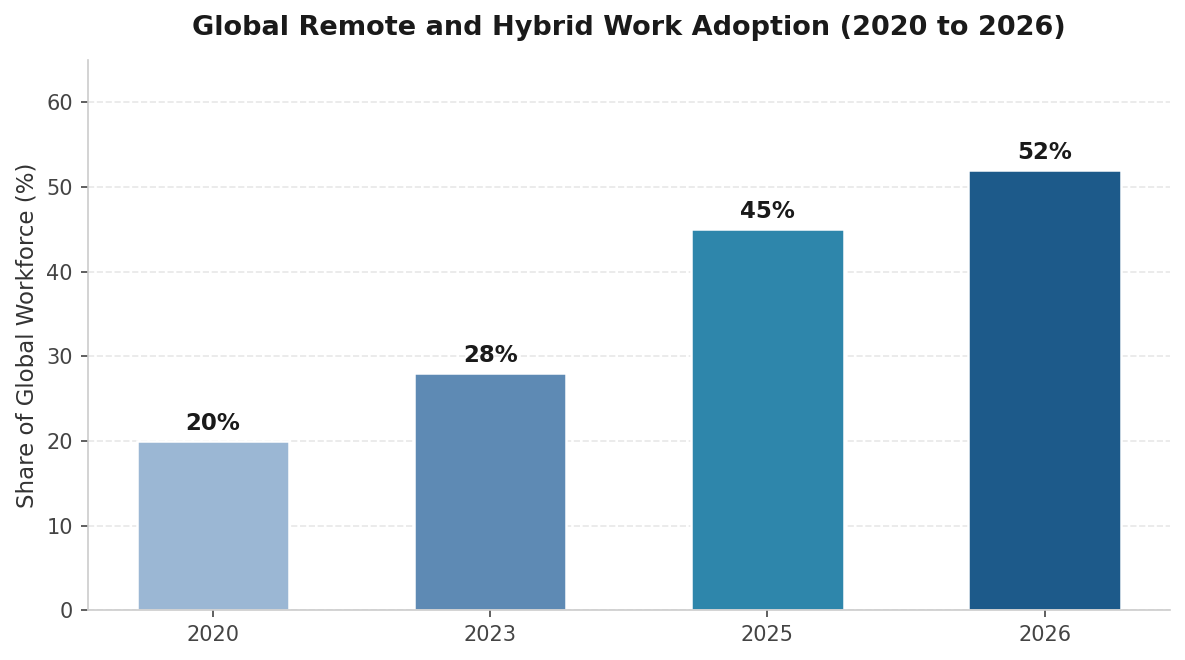
Source: Yomly Remote Work Statistics 2026, based on aggregated global workforce data.

Quick Stat

About 75% of workers with remote-capable jobs work from home at least some of the time, up from 5 to 6% before the pandemic. (Source: Bureau of Labor Statistics, 2025.)

Step 1: Choose the Right Remote Access Method

Before picking a vendor, decide what kind of access your team needs. The four mainstream options trade off security, performance, and effort differently.

Method

Best For

Strengths

Watch-Outs

VPN

Reaching internal apps on a private network

Encrypts traffic, well-understood

Slower over long distances, complex to maintain

RDP / Remote Desktop Protocol

Native Windows access on-network

Built into Windows, no extra licence

Risky if exposed to the internet, needs strong hardening

Cloud-based file access

Read-only documents and shared drives

Simple, browser-friendly

Limited app control, no full system access

Remote desktop software

Full screen control of office machines

Strong encryption, low-friction setup, cross-platform

Subscription cost per user or device

If most of your team needs to work as if sitting at their office computer, dedicated remote desktop software is usually the cleanest fit.

Pro Tip

Don’t try to standardise on one method for every job. Sales, finance, and design teams have different needs. A mixed setup is often more secure than one VPN.

Step 2: Inventory Users, Devices, and Apps

Map the territory before drawing roads. List every person who needs remote access, their connecting device, the machine or app they need, and the data sensitivity level.

This inventory becomes your access matrix. Skip it and you will either over-provision or chase constant one-off requests.

Step 3: Lock Down Security From Day One

Security cannot be a phase two project. Unsecured remote access is one of the easiest paths into a network, and attackers automate the search for weak endpoints. A small set of controls handles most of the risk. CISA guidance on multifactor authentication puts MFA at the top of every priority list for remote access.

Microsoft research shows that MFA blocks more than 99.2% of account compromise attacks, and over 99.99% of MFA-enabled accounts remained protected during a large-scale investigation.

Non-Negotiable Controls

  • End-to-end encryption: Sessions should use AES-256 or equivalent.
  • Multi-factor authentication: Apply it to every remote login. App-based authenticators beat SMS codes.
  • Role-based access control: Give each user access only to the systems they need, scoped by job.
  • Session logging: Capture who connected, when, from where, and for how long.
  • Auto-timeout: End sessions after a short period of inactivity.
  • Device verification: Bind sessions to known devices or require one-time approval for new ones.
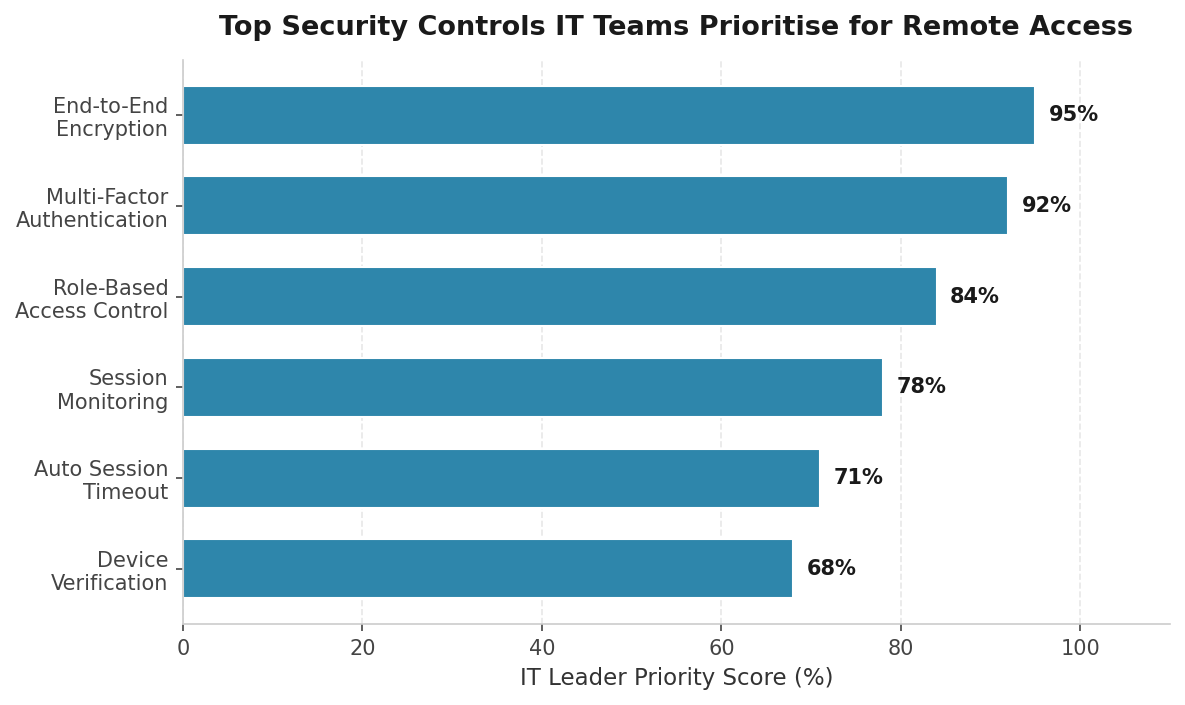
Source: Aggregated security priority data from Microsoft Entra MFA research, CISA guidance, and Duo Security 2024 trust report.

Warning

Never expose RDP or SSH ports directly to the public internet without a gateway or zero-trust broker in front. Open ports get scanned constantly, and credential-stuffing begins within minutes.

Step 4: Select Your Remote Access Software

Shortlist tools that fit your environment. Score each against five criteria rather than chasing the cheapest sticker price.

Criterion

What to Check

Security architecture

Encryption standard, MFA support, audit logging, SOC 2 or ISO 27001 certification

Cross-platform reach

Windows, macOS, Linux, iOS, Android, and any thin clients in use

Performance

Frame rate at 4K, latency in low-bandwidth conditions, file transfer speed

Management features

Central console, user groups, granular permissions, bulk deployment

Total cost of ownership

Per-user or per-device pricing, support tier, infrastructure overhead

Trial at least two products with a small pilot group before committing. A vendor’s polished demo rarely matches a real corporate network.

Step 5: Roll Out in Phases

Big-bang deployments fail loudly. A phased rollout catches problems while they are still small.

Pro Tip

Treat your help desk as a sensor. If onboarding generates more than two tickets per user, your documentation needs work before the next wave.

Step 6: Document Everything in a Runbook

If only one person knows how to onboard a new employee, you have a single point of failure. A runbook turns tribal knowledge into something repeatable. Cover these in plain language:

  • How to request remote access (form, approver, expected turnaround)
  • Step-by-step install for each supported device (Windows, macOS, mobile)
  • How to enable MFA and recover access if the second factor is lost
  • Troubleshooting checklist for slow sessions, frozen screens, and login failures
  • Offboarding for departing employees, including session termination and licence reclaim

Step 7: Audit, Monitor, and Improve

Remote access is an operating capability, not a launch project. Build a recurring review into the calendar.

Quarterly Audit Checklist

  • Review every active account. Disable any that have not logged in for 60 days.
  • Verify MFA is still enforced for every user (look for exceptions that crept in).
  • Spot-check session logs for unusual locations, times, or volume.
  • Confirm patch levels on the remote access agent and host operating systems.
  • Re-run the user inventory and remove people who changed roles or left.

Only 64% of organisations have fully deployed MFA across all accounts, and among small businesses the figure drops below 30%. The gap is mostly inertia, not budget.

Common Pitfalls to Avoid

  • Sharing logins: Even one shared account undermines every other control.
  • Skipping offboarding: Dormant accounts of ex-employees are a favourite target for attackers.
  • Exempting executives from MFA: Senior accounts are the most attractive prize, not the exception.
  • Forgetting personal devices: If staff connect from their own laptops, require current OS, disk encryption, and a screen lock.

Warning

Roughly 42% of organisations reported a successful phishing or social-engineering attack in the past year, according to PwC’s 2026 Global Digital Trust Insights. Train your team to spot fake login prompts.

Frequently Asked Questions

How long does it take to set up remote access for a small team?

A team of 10 to 25 people can usually be running on a polished remote desktop product within one to two weeks. Most of that time goes to inventory, policy, and a short pilot.

Is a VPN enough on its own?

A VPN protects the connection but does not control which devices connect or what they can reach. For most teams, pairing remote access software with MFA and role-based controls gives better security with less administrative overhead.

Do remote workers need company-issued laptops?

Not always. Many organisations support bring-your-own-device, provided the device meets minimum standards: a current operating system, full-disk encryption, an active screen lock, and approved security software.

How often should remote access permissions be reviewed?

Run a full audit every quarter at minimum. Also trigger a review whenever someone changes role, leaves the company, or returns from extended leave. Regular small reviews beat annual clean-ups.

What is the difference between remote access and remote control?

Remote access is the broad category of connecting to a system from another location. Remote control is one mode, where the user actively drives the remote machine’s screen, keyboard, and mouse.

Wrapping Up

A solid remote access rollout is less about the magical tool and more about working through the seven steps in order: choose the method, inventory users and devices, lock down security, pick software, pilot it, document the runbook, and audit quarterly. Teams that follow this sequence get fewer tickets, faster onboarding, and a smaller attack surface. Start with the boring parts first.

References

Bureau of Labor Statistics, American Time Use Survey, 2025 — https://www.bls.gov/news.release/atus.nr0.htm

Microsoft Research, How effective is multifactor authentication at deterring cyberattacks?, 2023 — https://www.microsoft.com/en-us/research/publication/how-effective-is-multifactor-authentication-at-deterring-cyberattacks/

Yomly, 50+ Remote Work Statistics 2026 — https://www.yomly.com/remote-work-statistics/

Vena, Remote Work Statistics and Trends for 2026 — https://www.venasolutions.com/blog/remote-work-statistics

CISA, Turn On Multifactor Authentication, 2025 — https://www.cisa.gov/secure-our-world/turn-mfa

Tags: home-slider

Continue Reading

Previous: Remote Desktop Access: Benefits, Risks, and Essential Practices
Next: Smart Packaging, Real Results: What a QR Code Generator Adds to Every Box

Trending Now

Wallet Based Crypto Swaps for Web3 Workflows 1

Wallet Based Crypto Swaps for Web3 Workflows

June 18, 2026
JavaScript SEO Rendering: What Search and AI Crawlers Need to See javascript seo rendering, seo javascript optimization, search engine javascript indexing, ai crawler javascript rendering, javascript seo best practices, javascript site indexing tips, javascript rendering for search engines, javascript seo crawler compatibility, javascript seo troubleshooting 2

JavaScript SEO Rendering: What Search and AI Crawlers Need to See

June 18, 2026
Image to Image Is Not Just a Feature — It Is a Workflow Shift image to image workflow, image to image technology, AI image transformation, creative image editing, visual content workflow, AI art generation software, image to image tools, digital art workflow, AI-powered image editing, image enhancement solutions 3

Image to Image Is Not Just a Feature — It Is a Workflow Shift

June 17, 2026
Proxy Types Defined: How To Choose the Right One for Your Case in 2026? proxy types, how to choose proxy, best proxy for business, proxy server options, proxy types comparison, high anonymity proxy, residential vs datacenter proxy, proxy solutions 2026, proxy selection guide, proxy usage for marketing 4

Proxy Types Defined: How To Choose the Right One for Your Case in 2026?

June 17, 2026
The Moneyball Effect: How Small Businesses Can Use Data Analytics to Compete with Giants small business data analytics, business intelligence tools, competitive edge small business, small business growth strategies, data-driven decision making, local business analytics, small business marketing data, analytics for small business success, small business growth tips, competitive strategies small businesses 5

The Moneyball Effect: How Small Businesses Can Use Data Analytics to Compete with Giants

June 17, 2026
What Is an MVP (Minimum Viable Product)? Why, Scope, Cost, and How to Build One mvp minimum viable product, build a mvp, mvp development guide, mvp scope cost, mvp strategy, how to create mvp, startup product development, mvp examples, mvp benefits, mvp validation 6

What Is an MVP (Minimum Viable Product)? Why, Scope, Cost, and How to Build One

June 16, 2026

Related Stories

JavaScript SEO Rendering: What Search and AI Crawlers Need to See javascript seo rendering, seo javascript optimization, search engine javascript indexing, ai crawler javascript rendering, javascript seo best practices, javascript site indexing tips, javascript rendering for search engines, javascript seo crawler compatibility, javascript seo troubleshooting
4 min read

JavaScript SEO Rendering: What Search and AI Crawlers Need to See

June 18, 2026 15
Image to Image Is Not Just a Feature — It Is a Workflow Shift image to image workflow, image to image technology, AI image transformation, creative image editing, visual content workflow, AI art generation software, image to image tools, digital art workflow, AI-powered image editing, image enhancement solutions
7 min read

Image to Image Is Not Just a Feature — It Is a Workflow Shift

June 17, 2026 21
Proxy Types Defined: How To Choose the Right One for Your Case in 2026? proxy types, how to choose proxy, best proxy for business, proxy server options, proxy types comparison, high anonymity proxy, residential vs datacenter proxy, proxy solutions 2026, proxy selection guide, proxy usage for marketing
3 min read

Proxy Types Defined: How To Choose the Right One for Your Case in 2026?

June 17, 2026 13
The Moneyball Effect: How Small Businesses Can Use Data Analytics to Compete with Giants small business data analytics, business intelligence tools, competitive edge small business, small business growth strategies, data-driven decision making, local business analytics, small business marketing data, analytics for small business success, small business growth tips, competitive strategies small businesses
5 min read

The Moneyball Effect: How Small Businesses Can Use Data Analytics to Compete with Giants

June 17, 2026 14
What Is an MVP (Minimum Viable Product)? Why, Scope, Cost, and How to Build One mvp minimum viable product, build a mvp, mvp development guide, mvp scope cost, mvp strategy, how to create mvp, startup product development, mvp examples, mvp benefits, mvp validation
29 min read

What Is an MVP (Minimum Viable Product)? Why, Scope, Cost, and How to Build One

June 16, 2026 23
The Future of Large Scale Digital Warfare and Online Competition large scale digital warfare, online competition strategies, cyber warfare future, digital conflict trends, online security threats, cyberattack prevention, competitive digital environment, military digital warfare, internet battle strategies, future of online conflicts
3 min read

The Future of Large Scale Digital Warfare and Online Competition

June 12, 2026 39

more you may love

Looking for Safe, No-Drama Hookups in 2026? Start Here 1

Looking for Safe, No-Drama Hookups in 2026? Start Here

February 26, 2026
A Look Into the Wild Wild Riches Returns Slot 2

A Look Into the Wild Wild Riches Returns Slot

February 26, 2026
Canadian Casino Play Styles: Casual Sessions, Focus Play, and Social Gaming 3

Canadian Casino Play Styles: Casual Sessions, Focus Play, and Social Gaming

February 25, 2026
How REST APIs Power Comparison and Aggregation Websites 4

How REST APIs Power Comparison and Aggregation Websites

February 25, 2026
How AI Agents Differ from Traditional Chatbots in Real Business Scenarios 5

How AI Agents Differ from Traditional Chatbots in Real Business Scenarios

February 25, 2026
programgeeks
1864 Zynlorind Lane
Vyxaril, NJ 59273
  • Home
  • Privacy Policy
  • Terms and Conditions
  • About Us
  • Contact Us
© 2026 programgeeks.net
We use cookies on our website to give you the most relevant experience by remembering your preferences and repeat visits. By clicking “Accept”, you consent to the use of ALL the cookies.
Do not sell my personal information.
Cookie SettingsAccept
Manage consent

Privacy Overview

This website uses cookies to improve your experience while you navigate through the website. Out of these, the cookies that are categorized as necessary are stored on your browser as they are essential for the working of basic functionalities of the website. We also use third-party cookies that help us analyze and understand how you use this website. These cookies will be stored in your browser only with your consent. You also have the option to opt-out of these cookies. But opting out of some of these cookies may affect your browsing experience.
Necessary
Always Enabled
Necessary cookies are absolutely essential for the website to function properly. These cookies ensure basic functionalities and security features of the website, anonymously.
CookieDurationDescription
cookielawinfo-checkbox-analytics11 monthsThis cookie is set by GDPR Cookie Consent plugin. The cookie is used to store the user consent for the cookies in the category "Analytics".
cookielawinfo-checkbox-functional11 monthsThe cookie is set by GDPR cookie consent to record the user consent for the cookies in the category "Functional".
cookielawinfo-checkbox-necessary11 monthsThis cookie is set by GDPR Cookie Consent plugin. The cookies is used to store the user consent for the cookies in the category "Necessary".
cookielawinfo-checkbox-others11 monthsThis cookie is set by GDPR Cookie Consent plugin. The cookie is used to store the user consent for the cookies in the category "Other.
cookielawinfo-checkbox-performance11 monthsThis cookie is set by GDPR Cookie Consent plugin. The cookie is used to store the user consent for the cookies in the category "Performance".
viewed_cookie_policy11 monthsThe cookie is set by the GDPR Cookie Consent plugin and is used to store whether or not user has consented to the use of cookies. It does not store any personal data.
Functional
Functional cookies help to perform certain functionalities like sharing the content of the website on social media platforms, collect feedbacks, and other third-party features.
Performance
Performance cookies are used to understand and analyze the key performance indexes of the website which helps in delivering a better user experience for the visitors.
Analytics
Analytical cookies are used to understand how visitors interact with the website. These cookies help provide information on metrics the number of visitors, bounce rate, traffic source, etc.
Advertisement
Advertisement cookies are used to provide visitors with relevant ads and marketing campaigns. These cookies track visitors across websites and collect information to provide customized ads.
Others
Other uncategorized cookies are those that are being analyzed and have not been classified into a category as yet.
SAVE & ACCEPT