
Skip to content
Programgeeks

Programgeeks

The Art of Social Hosting in a Tech-Savvy Era

Primary Menu
  • Home
  • Hosting
  • Social Media News
  • Crypto
  • Software
  • About Us
  • Contact Us
  • Home
  • JUST SOFTWARE
  • Dokie AI Overview: AI Presentations Look Much Better With GPT Image 2

Dokie AI Overview: AI Presentations Look Much Better With GPT Image 2

Doreen Achen May 14, 2026 6 min read
81
dokie ai presentations, ai presentation software, gpt image 2 for presentations, ai slide creation tools, ai presentation design, ai image generation for slides, professional ai presentations, ai presentation platform, ai-powered presentation tools

AI presentation makers are becoming popular because they help users create slides faster. You can enter a topic, notes, or a document, and the tool can generate a presentation draft in minutes.

But there is still one common problem: the visuals often look weak. Some AI-generated slides use images that feel too generic. Some images do not match the topic well. Some decks look inconsistent because every slide has a different visual style.

Dokie AI is improving this part of the workflow with GPT Image 2 support. This update makes the generated images much stronger and helps the final presentation look more polished.

In this Dokie AI review, we will look at why this matters and how Dokie AI can help users create better PPT slides.

Table of Contents

Toggle
  • What Is Dokie AI?
  • GPT Image 2 Makes the Generated Images Better
  • Better Visual Relevance for Each Slide
  • More Consistent Slide Style
  • Stronger PPT Structure
  • Why Dokie AI Is Useful for Business Presentations
  • PPT Templates and Free PPT Tools
  • Pros of Dokie AI
  • Cons of Dokie AI
  • Who Should Use Dokie AI?
  • Final Verdict
  • FAQs
    • 1. What is Dokie AI?
    • 2. Does Dokie AI support GPT Image 2?
    • 3. Why is GPT Image 2 useful for PPT creation?
    • 4. Is Dokie AI good for business presentations?
    • 5. Does Dokie AI have PPT templates?

What Is Dokie AI?

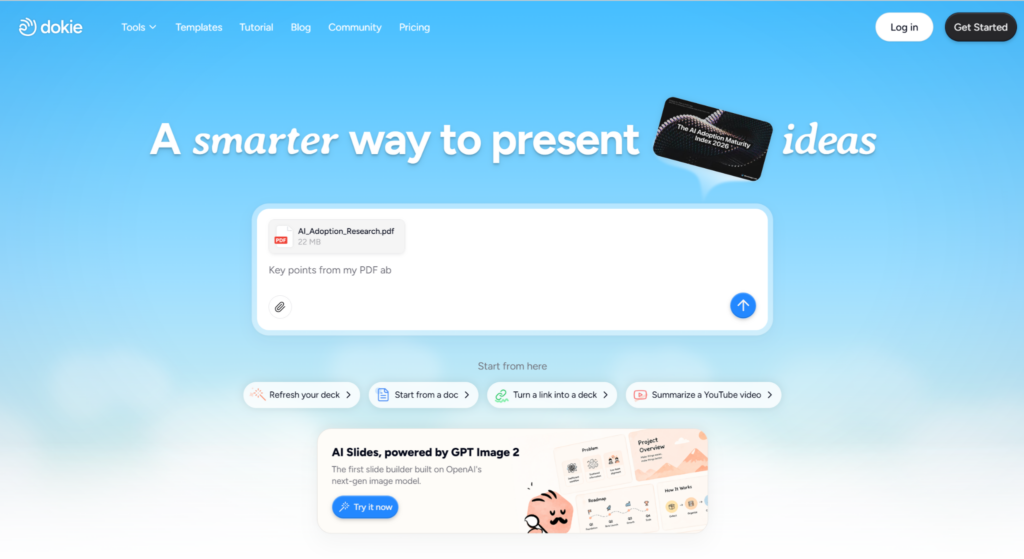
Dokie AI is an AI PPT maker designed to help users create editable PowerPoint-style presentations. Users can start with a prompt, topic, notes, document, or existing content, then generate a structured presentation draft.

Dokie AI can be used for many common presentation needs, such as business reports, pitch decks, marketing plans, education slides, client proposals, product updates, training materials, and technology presentations.

Its main value is speed and structure. Instead of starting from a blank slide, users can quickly get a complete first draft. The deck can then be edited, polished, exported, and used in real presentation scenarios.

GPT Image 2 Makes the Generated Images Better

The most important highlight of Dokie AI is its support for GPT Image 2.

This makes the image generation quality much better than many basic AI slide tools. The images are more detailed, more natural, and more connected to the slide topic.

For example, if you create a presentation about business strategy, AI productivity, healthcare, education, marketing, or startup growth, the generated visuals can better match the theme of each slide. This makes the presentation feel less generic and more complete.

Good images matter because they affect how the audience sees the whole deck. Even if the text is useful, weak visuals can make the presentation feel unfinished. With GPT Image 2, Dokie AI creates slides that look more refined and professional.

Better Visual Relevance for Each Slide

One of the biggest problems with AI-generated presentations is visual mismatch.

A slide may discuss market growth, but the image may look like a random office photo. Another slide may explain product workflow, but the visual may not show the idea clearly.

Dokie AI’s GPT Image 2 support helps improve this. The generated visuals can better follow the slide context, which makes the deck easier to understand.

This is especially useful for:

  • Business reports
  • Marketing plans
  • Product decks
  • Pitch decks
  • Education slides
  • Training materials
  • Technology presentations
  • Client proposals

When the image supports the message, the slide becomes stronger. The audience can understand the point faster, and the presentation feels more professional.

More Consistent Slide Style

GPT Image 2 also helps improve visual consistency.

In some AI-generated decks, every slide feels like it came from a different source. One slide may use a realistic photo, another may use a flat illustration, and another may use a completely different color style.

This can make the deck feel messy.

Dokie AI’s improved image generation helps the slides look more aligned. The visuals feel closer in tone and quality, which makes the whole deck more coherent.

This is important for business presentations and client-facing decks. A professional deck should feel consistent from the first slide to the last slide.

Stronger PPT Structure

Dokie AI is not only about better images. It also helps create a better presentation structure.

A good PPT needs logic. It should not be a random collection of slides. It should guide the audience through the topic step by step.

For example, a business report may need:

  • Executive summary
  • Key metrics
  • Main findings
  • Problems
  • Recommendations
  • Next steps
  • A pitch deck may need:
  • Problem
  • Solution
  • Product
  • Market
  • Business model
  • Traction
  • Team
  • Ask

Dokie AI helps generate this kind of structure faster. Users can then edit the content, add real data, and polish the final slides.

This makes Dokie AI useful for real presentation work, not just quick visual experiments.

Why Dokie AI Is Useful for Business Presentations

Dokie AI is especially useful for business users because business presentations need both structure and design.

A good business deck should explain the topic clearly, show the key information, and help the audience make a decision. It cannot only look pretty. It also needs a strong flow.

Dokie AI helps with both parts. It generates structured slide drafts and now creates stronger visuals with GPT Image 2.

This makes it useful for:

  • Weekly reports
  • Monthly reviews
  • Marketing plans
  • Sales decks
  • Client proposals
  • Pitch decks
  • Product updates
  • Strategy presentations
  • Training materials
  • For people who create PPTs often, Dokie AI can save a lot of time.

PPT Templates and Free PPT Tools

Dokie AI also provides many PPT templates for different use cases. These include Business, Education, Marketing, Medical, Technology, Pitch Deck, About Me, and Infographics.

Templates are useful because different presentations need different styles. A business report should not look the same as a class presentation or a medical training deck.

Dokie AI also offers free PPT tools such as PDF to PPT, Word to PPT, Text to PPT, Excel to PPT, JPG to PPT, PNG to PPT, HTML to PPT, and DOC to PPT.

These tools are helpful when your presentation starts from existing content. For example, you can turn a PDF report, Word document, Excel file, image, or HTML page into a PPT workflow faster.

Pros of Dokie AI

Dokie AI has several clear advantages.

First, it helps create presentation drafts quickly. This is useful when you do not want to start from a blank slide.

Second, it focuses on structure. The deck is easier to edit and present because the slides follow a clearer flow.

Third, GPT Image 2 support makes the visual quality much better. The generated images look more relevant, detailed, and professional.

Fourth, Dokie AI offers useful templates and free PPT tools, which makes it practical for different workflows.

Cons of Dokie AI

Dokie AI still needs human review.

AI can create a strong first draft, but users should still check the facts, numbers, wording, and slide order before using the final deck.

For important presentations, users may also need to add real data, brand elements, product screenshots, and final design polish.

The output also depends on the prompt. A clear prompt usually leads to a better presentation.

Who Should Use Dokie AI?

Dokie AI is a good choice for users who create presentations often.

Office workers can use it for reports, reviews, and team updates.

Marketers can use it for campaign reports, SEO plans, launch decks, and strategy presentations.

Founders can use it for pitch decks, product decks, and investor updates.

Teachers and students can use it for lessons, class projects, and research presentations.

Consultants and agencies can use it for client proposals, audit reports, and strategy decks.

Product and technology teams can use it for roadmaps, product updates, and technical explainers.

Final Verdict

Dokie AI is a strong AI PPT maker for users who want faster, clearer, and better-looking presentations.

Its support for GPT Image 2 is a major advantage. It improves the generated images, makes slides more visually relevant, and helps the whole deck look more professional.

At the same time, Dokie AI still focuses on structure, which is important for real PPT work. A presentation should not only look good. It should also be easy to understand and present.

For business users, marketers, founders, teachers, students, consultants, and teams that create slides often, Dokie AI is worth trying.

FAQs

1. What is Dokie AI?

Dokie AI is an AI PPT maker that helps users create editable PowerPoint-style presentations from prompts, notes, documents, and existing content.

2. Does Dokie AI support GPT Image 2?

Yes. Dokie AI supports GPT Image 2, which improves the quality, relevance, and consistency of generated images in presentations.

3. Why is GPT Image 2 useful for PPT creation?

GPT Image 2 helps create better visuals that match the slide topic more closely. This makes the deck look more professional and less generic.

4. Is Dokie AI good for business presentations?

Yes. Dokie AI is useful for business reports, strategy decks, client proposals, product presentations, marketing plans, and pitch decks.

5. Does Dokie AI have PPT templates?

Yes. Dokie AI offers PPT templates for Business, Education, Marketing, Medical, Technology, Pitch Deck, About Me, and Infographics.

Tags: home-slider

Continue Reading

Previous: The Hidden Cost Of Messy Music Generation
Next: Understanding Margin Trading in the Modern Developer Economy

Trending Now

Crypto Custody Services to Look For 1

Crypto Custody Services to Look For

June 9, 2026
QQWIN4D Jackpot Edition: Games With The Biggest Win Potential 2

QQWIN4D Jackpot Edition: Games With The Biggest Win Potential

June 8, 2026
The Ultimate Weekend Playlist: KUY4D Games to Play with Friends 3

The Ultimate Weekend Playlist: KUY4D Games to Play with Friends

June 8, 2026
3 Tools to Explore Alternatives to ServiceNow serviceNow alternatives, IT service management tools, serviceNow competitors, ITSM software solutions, enterprise service management, business process automation, cloud IT management tools, service management platforms, IT support tools, workflow automation software 4

3 Tools to Explore Alternatives to ServiceNow

June 8, 2026
Key Applications of Dry Ice Blasting Across Manufacturing and Maintenance dry ice blasting, manufacturing cleaning solutions, maintenance cleaning equipment, dry ice cleaning applications, industrial cleaning technologies, dry ice cleaning benefits, dry ice blasting services, eco-friendly cleaning solutions, dry ice cleaning equipment, construction site cleaning 5

Key Applications of Dry Ice Blasting Across Manufacturing and Maintenance

June 8, 2026
Bitcoin Peaked at $126,000. Blockforia on Where It Could Go in 2027. bitcoin price prediction 2027, bitcoin peak valuation 2027, bitcoin analysis 2027, cryptocurrency market forecast, bitcoin value growth, blockchain investment opportunities, bitcoin price target 2027, digital currency market trends, cryptocurrency investment strategies, blockforia bitcoin analysis 6

Bitcoin Peaked at $126,000. Blockforia on Where It Could Go in 2027.

June 6, 2026

Related Stories

Low-Code vs No-Code – What’s the Difference? low code solutions, no code development tools, low code vs no code, low code platforms, no code app builders, low code software benefits, no code automation, low code vs no code differences, low code for enterprises, no code citizen development
5 min read

Low-Code vs No-Code – What’s the Difference?

June 4, 2026 34
Money-Earning Apps That Actually Pay in 2026 money earning apps 2026, best paying apps 2026, earn money online 2026, top money apps 2026, apps that pay real money, profitable money apps 2026, high earning apps, mobile income apps 2026, cash earning apps permanently, location-specific money apps
7 min read

Money-Earning Apps That Actually Pay in 2026

May 27, 2026 69
The Ticketing Industry vs the Bots – Can it Win? ticketing industry bots, ticketing bots prevention, online ticket sales security, ticketing fraud solutions, concert ticketing bots, automated ticketing abuse, ticket sale security software, event ticketing challenges, ticket fraud prevention strategies, ticketing industry technology
3 min read

The Ticketing Industry vs the Bots – Can it Win?

May 22, 2026 92
Understanding Margin Trading in the Modern Developer Economy Developer working on code at computer representing integration of multiple game providers
3 min read

Understanding Margin Trading in the Modern Developer Economy

May 21, 2026 95
The Hidden Cost Of Messy Music Generation music generation costs, messy music production, audio editing challenges, music industry inefficiencies, music creation expenses, digital music production pitfalls, music technology costs, audio quality issues, music publishing hurdles, location-specific music production
6 min read

The Hidden Cost Of Messy Music Generation

May 13, 2026 130
Portfolio vs Resume: What Matters More in Tech Hiring? portfolio vs resume tech hiring, tech hiring portfolio importance, resume vs portfolio for developers, tech job application tips, portfolio benefits in tech, resume tips for tech jobs, tech hiring strategies, portfolio showcase tech careers, tech employment resume advice, tech hiring process
4 min read

Portfolio vs Resume: What Matters More in Tech Hiring?

April 24, 2026 217

more you may love

Looking for Safe, No-Drama Hookups in 2026? Start Here 1

Looking for Safe, No-Drama Hookups in 2026? Start Here

February 26, 2026
A Look Into the Wild Wild Riches Returns Slot 2

A Look Into the Wild Wild Riches Returns Slot

February 26, 2026
Canadian Casino Play Styles: Casual Sessions, Focus Play, and Social Gaming 3

Canadian Casino Play Styles: Casual Sessions, Focus Play, and Social Gaming

February 25, 2026
How REST APIs Power Comparison and Aggregation Websites 4

How REST APIs Power Comparison and Aggregation Websites

February 25, 2026
How AI Agents Differ from Traditional Chatbots in Real Business Scenarios 5

How AI Agents Differ from Traditional Chatbots in Real Business Scenarios

February 25, 2026
1864 Zynlorind Lane
Vyxaril, NJ 59273
  • Home
  • Privacy Policy
  • Terms and Conditions
  • About Us
  • Contact Us
© 2026 programgeeks.net
We use cookies on our website to give you the most relevant experience by remembering your preferences and repeat visits. By clicking “Accept”, you consent to the use of ALL the cookies.
Do not sell my personal information.
Cookie SettingsAccept
Manage consent

Privacy Overview

This website uses cookies to improve your experience while you navigate through the website. Out of these, the cookies that are categorized as necessary are stored on your browser as they are essential for the working of basic functionalities of the website. We also use third-party cookies that help us analyze and understand how you use this website. These cookies will be stored in your browser only with your consent. You also have the option to opt-out of these cookies. But opting out of some of these cookies may affect your browsing experience.
Necessary
Always Enabled
Necessary cookies are absolutely essential for the website to function properly. These cookies ensure basic functionalities and security features of the website, anonymously.
CookieDurationDescription
cookielawinfo-checkbox-analytics11 monthsThis cookie is set by GDPR Cookie Consent plugin. The cookie is used to store the user consent for the cookies in the category "Analytics".
cookielawinfo-checkbox-functional11 monthsThe cookie is set by GDPR cookie consent to record the user consent for the cookies in the category "Functional".
cookielawinfo-checkbox-necessary11 monthsThis cookie is set by GDPR Cookie Consent plugin. The cookies is used to store the user consent for the cookies in the category "Necessary".
cookielawinfo-checkbox-others11 monthsThis cookie is set by GDPR Cookie Consent plugin. The cookie is used to store the user consent for the cookies in the category "Other.
cookielawinfo-checkbox-performance11 monthsThis cookie is set by GDPR Cookie Consent plugin. The cookie is used to store the user consent for the cookies in the category "Performance".
viewed_cookie_policy11 monthsThe cookie is set by the GDPR Cookie Consent plugin and is used to store whether or not user has consented to the use of cookies. It does not store any personal data.
Functional
Functional cookies help to perform certain functionalities like sharing the content of the website on social media platforms, collect feedbacks, and other third-party features.
Performance
Performance cookies are used to understand and analyze the key performance indexes of the website which helps in delivering a better user experience for the visitors.
Analytics
Analytical cookies are used to understand how visitors interact with the website. These cookies help provide information on metrics the number of visitors, bounce rate, traffic source, etc.
Advertisement
Advertisement cookies are used to provide visitors with relevant ads and marketing campaigns. These cookies track visitors across websites and collect information to provide customized ads.
Others
Other uncategorized cookies are those that are being analyzed and have not been classified into a category as yet.
SAVE & ACCEPT